For many years, investing through the National Pension System (NPS) was relatively straightforward. You selected a Pension Fund Manager, chose an investment option and continued contributing towards your retirement. Whether the money came from your own NPS contribution or through your employer under Corporate NPS, the process largely worked in the background.
This worked well because NPS subscribers were largely investing through the Common Scheme structure, rather than building a portfolio across multiple schemes. But with the introduction of the Multiple Scheme Framework (MSF) for non-government subscribers, investors can now choose multiple schemes and construct a portfolio within their NPS account.
Once you build such a portfolio, however, a natural question arises: how does the Corporate NPS contribution get allocated among your portfolio schemes? The same question applies if you are making your own contributions or creating an SIP into NPS. If you have chosen three different schemes, where should the next contribution go?
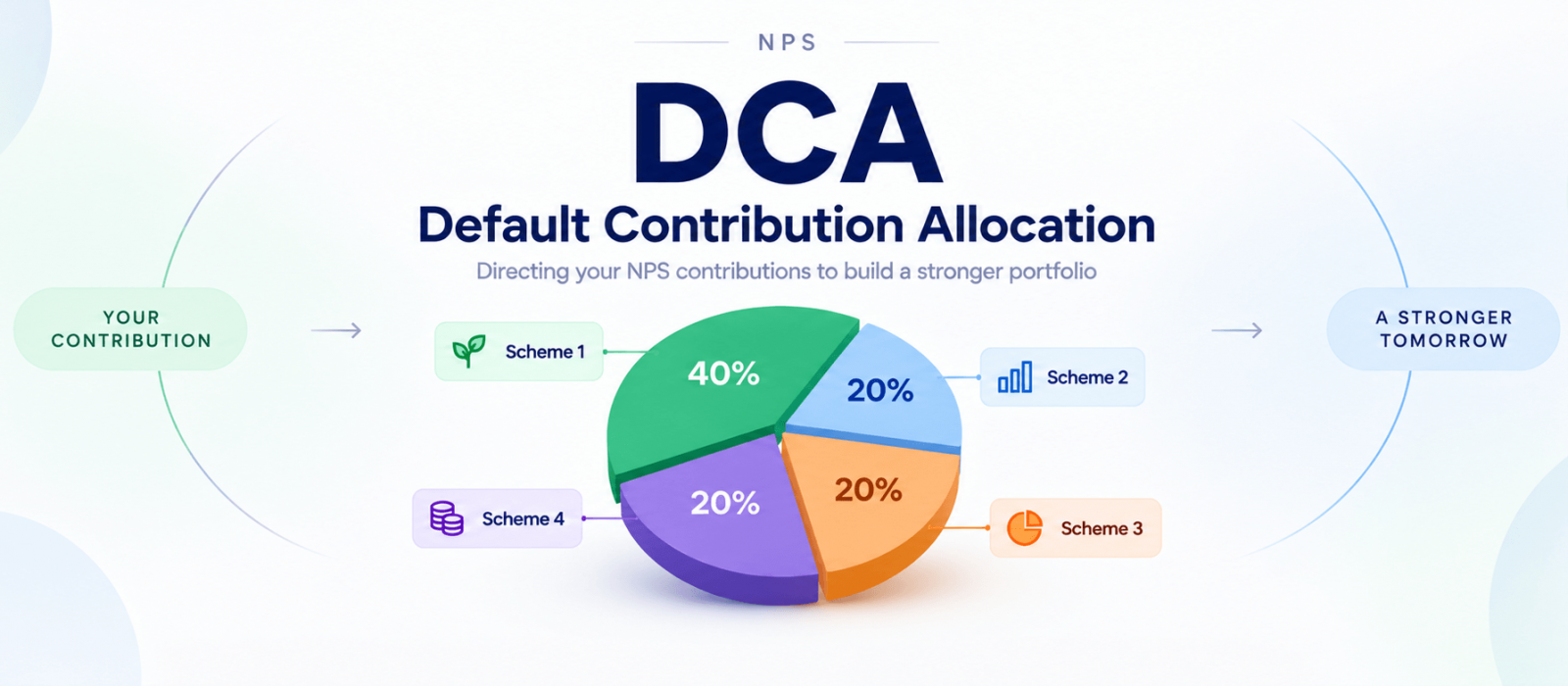
This is where Default Contribution Allocation (DCA) becomes important. In simple terms, NPS contribution allocation determines where your future NPS contributions will be invested when you have selected multiple schemes.
This changes the way we can think about Corporate NPS. It is no longer simply about selecting an NPS scheme and continuing to contribute. It can now be about building a retirement portfolio and deciding how every future contribution should be allocated to that portfolio.
From one NPS scheme to a portfolio
The Multiple Scheme Framework has fundamentally changed the investment flexibility available to non-government NPS subscribers. Subscribers can now invest across multiple schemes under the same PRAN, allowing them to build a portfolio rather than having their entire retirement corpus concentrated in a single scheme.
This opens up a much more interesting way of looking at NPS.
Imagine that instead of putting your entire NPS investment into one scheme, you decide to build a portfolio of four schemes. You may choose to allocate 40% to Scheme 1 and 20% each to Schemes 2, 3 and 4.
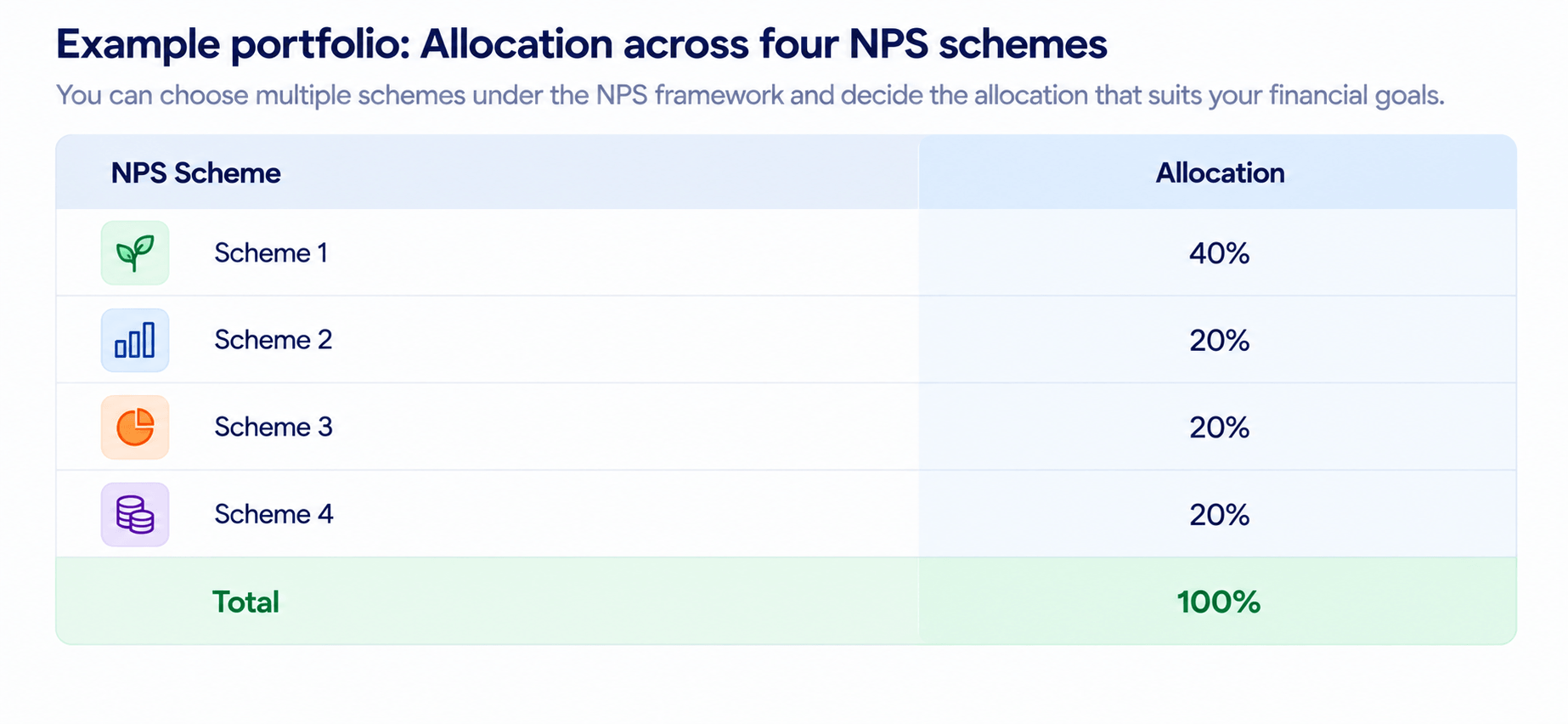
The portfolio is now defined. But there is an obvious practical question.
What happens when the next contribution arrives?
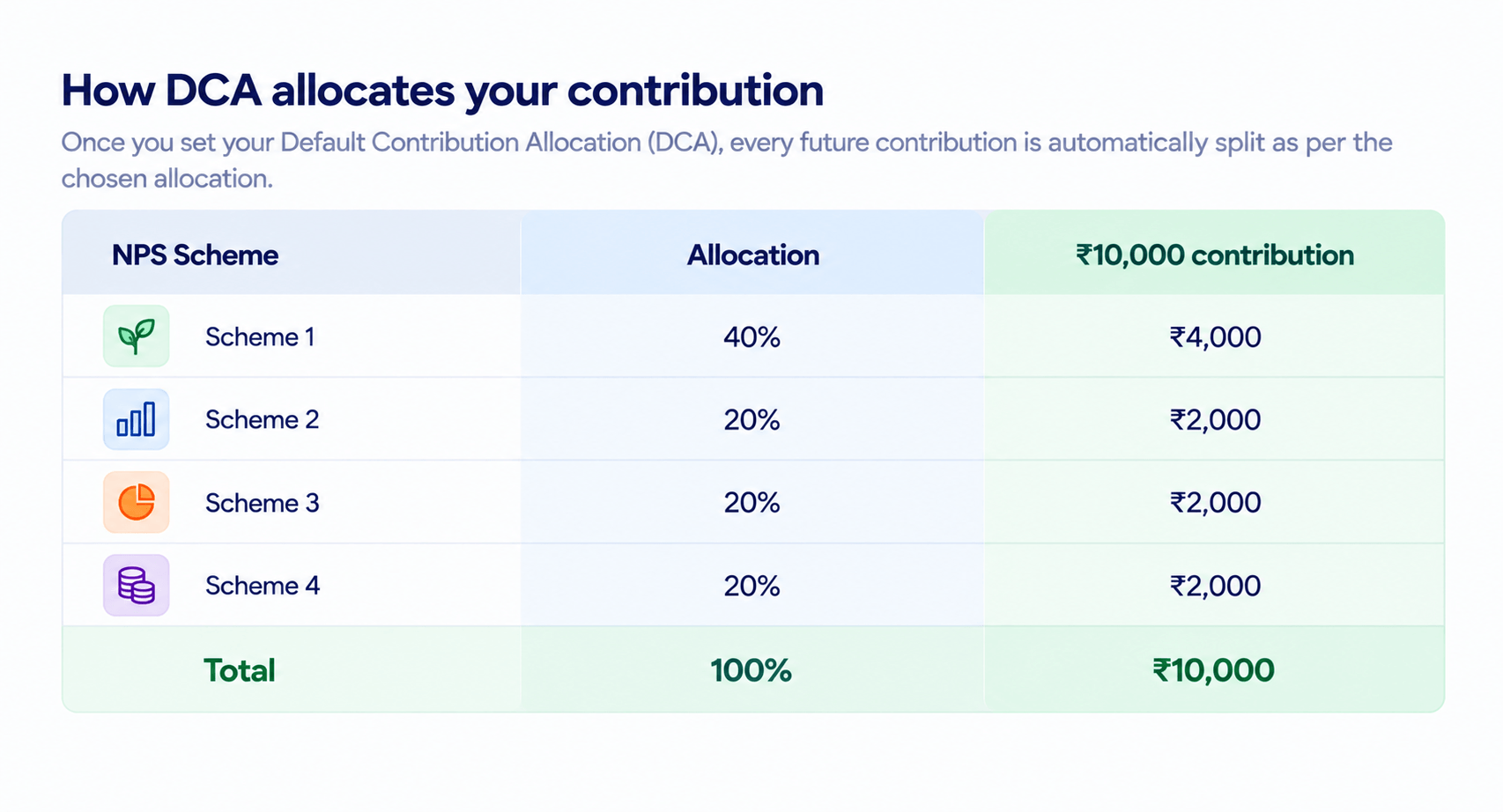
Suppose your employer contributes ₹10,000 to your Corporate NPS account next month. You have already decided that you want a 40%-20%-20%-20% portfolio. You would ideally want that ₹10,000 to follow the same allocation.
That means ₹4,000 would go into Scheme 1 and ₹2,000 each into the other three schemes.
This is precisely where Default Contribution Allocation, or DCA, comes in.
What Is Default Contribution Allocation (DCA) in NPS?
DCA allows an NPS subscriber to define how future contributions should be distributed across the selected schemes.
Once the allocation is set, the contribution can be divided automatically according to those percentages. So in our ₹10,000 example, the allocation would happen according to the selected 40%-20%-20%-20% structure.
The real advantage becomes clearer when the contribution changes.
Suppose your Corporate NPS contribution increases to ₹15,000 as your salary grows. You don’t need to redesign the portfolio. The same DCA would simply allocate ₹6,000 to Scheme 1 and ₹3,000 each to Schemes 2, 3 and 4.
Your contribution amount has changed, but your investment strategy remains consistent.
This is particularly useful for Corporate NPS because the contribution itself is often linked to the payroll process. The investment happens automatically, and DCA can determine how that money is distributed across the portfolio.
Why this matters for an employee
There is a behavioural advantage here that is easy to overlook.
Long-term investing becomes difficult when every contribution requires another decision. If an employee has four NPS schemes, they could theoretically decide every month where the next contribution should go. But over 10, 20 or 30 years, repeatedly making the same decision is unnecessary.
DCA allows that decision to be made upfront.
Once an employee has decided on a portfolio that suits their investment objectives, future contributions can follow the same structure without requiring manual allocation every month.
This makes Corporate NPS particularly interesting as a salary-linked investment mechanism. The employee’s contribution can happen automatically through payroll, while the portfolio allocation can also happen automatically through DCA.
In effect, the employee is not merely making a monthly retirement contribution. They are systematically adding to a retirement portfolio.
DCA is not the same as setting and forgetting
There is, however, an important distinction.
Automating the allocation does not mean that the portfolio should never be reviewed.
A person’s financial circumstances can change significantly over a career. Someone starting Corporate NPS at 25 may have a very different investment horizon, income level and financial responsibility at 40 or 50.
The portfolio may therefore need to evolve as the investor’s circumstances change.
DCA makes it easier to implement the allocation you have chosen; it does not decide what that allocation should be. The investor still needs to review the portfolio periodically and determine whether the underlying investment strategy remains appropriate.
The flexibility introduced by MSF is therefore not about continuously changing investments. It is about having greater control over how the retirement portfolio is constructed and how future money gets added to it.
More choices do not necessarily mean a better portfolio
The introduction of multiple schemes should also not be interpreted as a reason to select as many schemes as possible.
A four-scheme portfolio is not automatically better than a two-scheme portfolio, just as a two-scheme portfolio is not automatically better than one.
What matters is the purpose each scheme serves within the overall portfolio.
An investor may choose different schemes because they have different investment approaches, risk characteristics or asset allocations. The objective should be to create a portfolio that the investor understands and is comfortable holding over a long period.
The real benefit of MSF is therefore choice, not complexity.
And DCA is what makes that choice practical for future contributions.
What Corporate NPS subscribers should check
For employees who already have Corporate NPS, this is worth reviewing.
Start by checking which scheme or schemes currently hold your NPS investments and how future contributions are being allocated. If you have moved from the earlier Common Scheme structure to a portfolio under MSF, make sure your future contribution allocation reflects the portfolio you actually intend to build.
For example, if you have consciously created a 40%-20%-20%-20% portfolio but your future contributions are not being allocated according to that structure, your accumulated portfolio and your future investment strategy could gradually move in different directions.
That is why understanding DCA is important.
It is not another investment product. It is the mechanism that connects your future contributions to the portfolio you have chosen.
The bigger change in Corporate NPS
The significance of DCA goes beyond simply automating an allocation. Corporate NPS brings retirement investing into the payroll system, while the Multiple Scheme Framework gives employees greater flexibility to construct their investment portfolio. DCA connects the two by allowing future contributions to follow the portfolio the employee has chosen.
The model is therefore becoming:
Salary → Corporate NPS contribution → DCA → Multiple NPS schemes → Retirement portfolio
NPS is gradually moving beyond the idea of being simply a retirement account. For subscribers using the Multiple Scheme Framework, it can increasingly be viewed as a retirement portfolio that can be deliberately constructed and managed over time.
This article was also featured in Financial Express, where I wrote about how the Multiple Scheme Framework and Default Contribution Allocation are giving NPS subscribers greater flexibility to construct and manage their retirement portfolios.
This subject was also featured in Financial Express
Frequently Asked Questions (FAQ)
1. What is Default Contribution Allocation (DCA) in NPS?
Default Contribution Allocation (DCA) is a facility that allows NPS subscribers to decide how their future contributions should be distributed across their selected NPS schemes. The subscriber can assign a specific percentage to each scheme, with the total allocation adding up to 100%.
2. How does DCA work in Corporate NPS?
In Corporate NPS, the employer’s contribution made through payroll can be allocated across the schemes selected by the employee according to the DCA instructions. For example, if DCA is set at 40% in Scheme 1 and 20% each in Schemes 2, 3 and 4, a ₹10,000 contribution would be distributed as ₹4,000, ₹2,000, ₹2,000 and ₹2,000 respectively. This allocation continues for future contributions unless the subscriber changes it.
3. Can NPS contributions be allocated across multiple schemes?
Yes. Under the Multiple Scheme Framework (MSF), non-government NPS subscribers can invest across multiple schemes under their NPS account. DCA allows future contributions to be divided among those selected schemes according to the percentages chosen by the subscriber.
4. Can I change my DCA allocation later?
Yes. The DCA allocation can be modified through the NPS account’s scheme allocation facility. Subscribers can change the percentage assigned to their selected schemes, including setting a particular scheme’s allocation to zero, provided the total DCA allocation is 100%.
5. What is the difference between MSF and DCA in NPS?
MSF and DCA serve different purposes. MSF gives you the ability to invest across multiple NPS schemes, while DCA determines how your future contributions are distributed among those selected schemes.
In simple terms, MSF gives you the portfolio choices; DCA determines where your next contribution goes.
6. How to set up or change my Default Contribution Allocation?
You can set your DCA through your CRA portal. Login to Protean, KFIN or CAMS with your PRAN.
- Go to Scheme Allocation → Default Contribution Allocation
- Select existing schemes or add a new one
- Enter 100% for a single scheme, or split percentages totalling 100%
- Generate OTP and submit