Corporate NPS allows employees to build their retirement savings through the National Pension System with their employer playing a role in the contribution process.
The underlying NPS account remains your account, but it is linked to your employer under the Corporate Sector. This can make it easier for employers to contribute to your NPS through payroll, while you continue to build your retirement corpus.
Here is how Corporate NPS works for an employee.
1. Check if your employer offers Corporate NPS
The first step is to check with your employer whether Corporate NPS is available as an employee benefit.
You can join NPS under the Corporate Sector only if your employer has enabled the benefit. If your organisation has not adopted Corporate NPS, you cannot independently open an account under its Corporate Sector arrangement.
Your HR or payroll team should be able to confirm whether the benefit is available and, if so, explain the process followed by your organisation.
2. Open your NPS account under the Corporate Sector
If your employer offers Corporate NPS, you can create your NPS account through the service provider associated with your employer.
For example, if your organisation uses Floatr, you can open your Corporate NPS account through the Floatr app in under 5 minutes.
During account opening, you will generally need to:
- Complete your KYC
- Select your employer
- Enter the required employment details
- Select your NPS investment options
- Complete the account-opening process
Once the required details are submitted, your NPS account and PRAN (Permanent Retirement Account Number) are generated instantly.
Do you need to invest money to open the account? No initial investment is required to open a Corporate NPS account.
This is useful because you can complete the account-opening process first and then have contributions made through your employer’s payroll process.
With a digital account-opening process, the registration itself can typically take only a few minutes.
3. Employer approval completes the Corporate NPS setup
Opening the account is not the end of the process.
Since your NPS account is being registered under your employer’s Corporate Sector arrangement, the registration needs to be approved through the employer’s designated process. The person responsible for this within the organisation is commonly referred to as the Nodal Officer.
Once the registration is approved, your account is ready to receive Corporate NPS contributions.
This is the key difference from opening an NPS account independently: your employer becomes part of the administrative and contribution process.
4. Already have an NPS account? You don’t need another one
If you already have an active NPS account and therefore already have a PRAN, you do not need to create a second NPS account simply because your employer is offering Corporate NPS.
Instead, your existing NPS account can be shifted or mapped to the Corporate Sector arrangement.
Depending on the service provider associated with your employer, this process may be available digitally. For example, through Floatr, the process can be completed in a few steps on the mobile app.
The actual time taken for the shift can vary. In some cases, particularly where the process involves an inter-CRA (Central Recordkeeping Agency) shift, it can take longer and may take up to around a week.
Once the shift is completed, the existing PRAN is ready for Corporate NPS contributions.
An important point: If shifting involves CRA shifting, your access to the existing CRA will cease to exist and you can access your NPS from the new CRA portal. For example, if your account shifts from Protean to KFIN CRA, you should login to CRA portal of KFIN instead of Protean after the shift. Your Protean login will be deactivated in this case.
5. Tell your payroll team how much you want to contribute
Opening or shifting your NPS account is only one part of the process.
You should also inform your HR or payroll team about your intended NPS contribution, as per your organisation’s process.
This declaration helps your employer know how much should be deducted from your salary, where applicable, and/or processed as an employer contribution.
The exact payroll process can vary from one organisation to another, so employees should follow the instructions provided by their employer.
6. Your employer can then contribute to your NPS
Once your Corporate NPS account is active and the payroll process is set up, your employer can make contributions to your NPS account. You do not play further role in this process.
You can also continue making your own contributions to NPS.
This is one of the biggest advantages of Corporate NPS: your employer can contribute to your retirement account as part of the employer’s benefit structure.
Instead of relying only on your personal savings, Corporate NPS can therefore allow your retirement corpus to receive contributions from both you and your employer.
What happens to your NPS investments?
Corporate NPS does not mean that your employer takes control of your investments.
Your NPS account continues to be yours, and you retain the ability to manage your NPS investment choices within the options available to you.
You can continue to make decisions around your:
- Investment allocation
- NPS schemes
- Pension fund manager, where choice is available
- Portfolio
The Corporate Sector primarily changes how the NPS account is connected to your employment and how contributions can flow through the employer. It does not turn your NPS account into an employer-owned account.
In short: How Corporate NPS works
The Corporate NPS journey can be simplified into these steps:
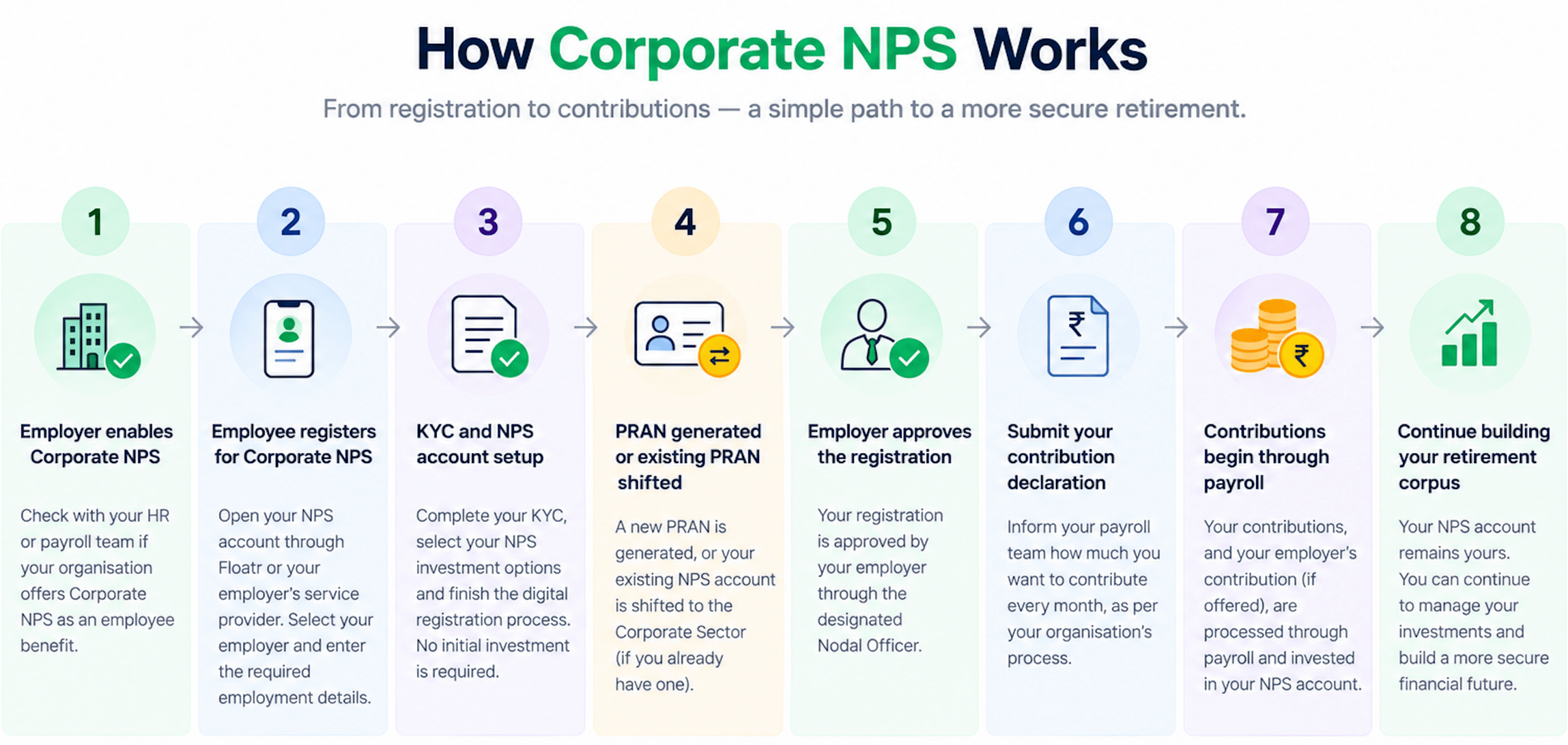
- Check whether your employer offers Corporate NPS
- Open your NPS account under the Corporate Sector
- Complete employer approval
- Shift or map your existing PRAN, if you already have an NPS account
- Submit your contribution declaration to your HR or payroll team
- Employer contributions begin through the payroll process
- Continue building your retirement savings
One NPS account. A simpler way to build retirement savings.
Corporate NPS essentially brings your NPS account into your workplace’s benefits and payroll ecosystem. Your account remains yours, while your employer can facilitate and contribute towards your retirement savings.
For employees whose organisations offer the benefit, the process of getting started can be relatively simple—and importantly, you don’t need to create a new PRAN if you already have an existing NPS account.